
Cropy AI Alternative: WheelStage vs Cropy AI
 AO from WheelStage·4 min read
Cropy AI is a mobile-first car photo editing platform used by over 1,500 dealerships in 15+ countries. It's one of the closer competitors to WheelStage in terms of what it actually does — both tools are primarily focused on turning ordinary car photos into studio-quality images using AI. But they differ in meaningful ways when it comes to workflow, pricing, and how you actually use them day to day.
Here's a detailed breakdown.
Quick Comparison
| Cropy AI | WheelStage | |
|---|---|---|
| Approach | Mobile app + web platform | Web-based tool |
| Pricing | Monthly subscription from ~$24/mo | Pay-as-you-go from $0.19/img |
| Mobile App | Yes (iOS & Android) | No (browser-based) |
| 360° Spin | Yes (from video) | No |
| Image Upscaling | Yes (4x) | No |
| Plate Blur Option | Logo overlay on plates | Yes (blur + optional logo) |
| Speed | A few minutes | ~30 seconds per image |
How Cropy AI Works
Cropy AI is built around a mobile app available on iOS and Android. The typical workflow is: open the app on the lot, photograph the vehicle, and the AI processes the image — replacing the background, adding realistic shadows, and optionally placing your dealership logo on the license plate area.
Beyond basic background replacement, Cropy AI packs in several additional features:
- 360° virtual spin — converts a walk-around video of the car into an interactive 360° view for your listing
- Image upscaling — enlarges low-resolution photos by 4x, useful if you're working with older or compressed images
- Reflection removal — reduces sunlight glare and environmental reflections on the car's surface
- Angle correction — automatically adjusts the vehicle's positioning in the frame
- License plate branding — places your dealership logo directly on the plate area
- API integrations — for connecting Cropy to your existing systems
It's a feature-rich platform that tries to handle multiple aspects of vehicle photography beyond just background editing.
How WheelStage Works
WheelStage is a web-based tool that you access through your browser — no app to install. You upload a car photo (from your phone, camera, or any source), choose a studio background, and get a processed result in about 30 seconds.
The feature set is intentionally narrower:
- AI background replacement with multiple studio presets
- Automatic license plate blurring with optional logo overlay
- Custom logo placement on processed images
- Batch processing — upload multiple images at once
- Pay-as-you-go credits — no subscription, no auto-renewals
WheelStage doesn't do 360° spins, image upscaling, or reflection removal. What it does do — background replacement — it does quickly and at a competitive price point.
Mobile App vs. Browser
This is probably the most practical difference between the two tools for daily use.
Cropy AI's mobile app puts everything in one place: capture the photo, edit it, and publish — all from your phone on the lot. If your staff photographs vehicles with their phones and you want them to process images immediately without switching to a computer, this workflow has clear advantages. The trade-off is that you're tied to the app — updates, compatibility, storage — and editing on a small screen isn't for everyone.
WheelStage runs in the browser, which means it works on any device without installation. Take photos with your phone, AirDrop or email them to yourself, and process them from your desktop. Or open the browser on your phone and upload directly. For dealerships where one person handles photography and another handles listings, this separation can actually be more efficient — the photos flow into whatever workflow already exists.
Neither approach is objectively better. It depends on whether you want an all-in-one mobile experience or a flexible tool that fits into your existing process.
Pricing
This is where the comparison gets interesting because both tools are relatively affordable — but structured very differently.
Cropy AI uses monthly subscriptions with credits included:
| Plan | Monthly Price | Credits | ~Per Image |
|---|---|---|---|
| Basic | ~$24/mo | 50 | ~$0.48 |
| Starter | ~$43/mo | 100 | ~$0.43 |
| Pro | ~$108/mo | 300 | ~$0.36 |
| Premium | ~$162/mo | 500 | ~$0.32 |
Prices converted from EUR at approximate rates. Yearly plans available. Check cropy.ai/pricing for the latest rates.
WheelStage uses pay-as-you-go pricing:
| Credits | Price | Per Image |
|---|---|---|
| 50 | $19 | $0.38 |
| 200 | $66 | $0.33 |
| 500 | $140 | $0.28 |
| 2,000 | $460 | $0.23 |
| 5,000 | $950 | $0.19 |
No subscriptions, no auto-renewals. Buy credits when you need them.
At comparable volumes, WheelStage comes in cheaper. 50 images on Cropy's Basic plan costs ~$24/month as a recurring subscription. The same 50 credits on WheelStage costs $19 one-time. At 300 images, Cropy's Pro plan is ~$108/month; WheelStage's 500-credit pack is $140 one-time for nearly twice the images.
The bigger difference is the model itself. With Cropy, you pay every month whether you use all your credits or not. With WheelStage, you buy credits once and use them whenever — next week or next year.
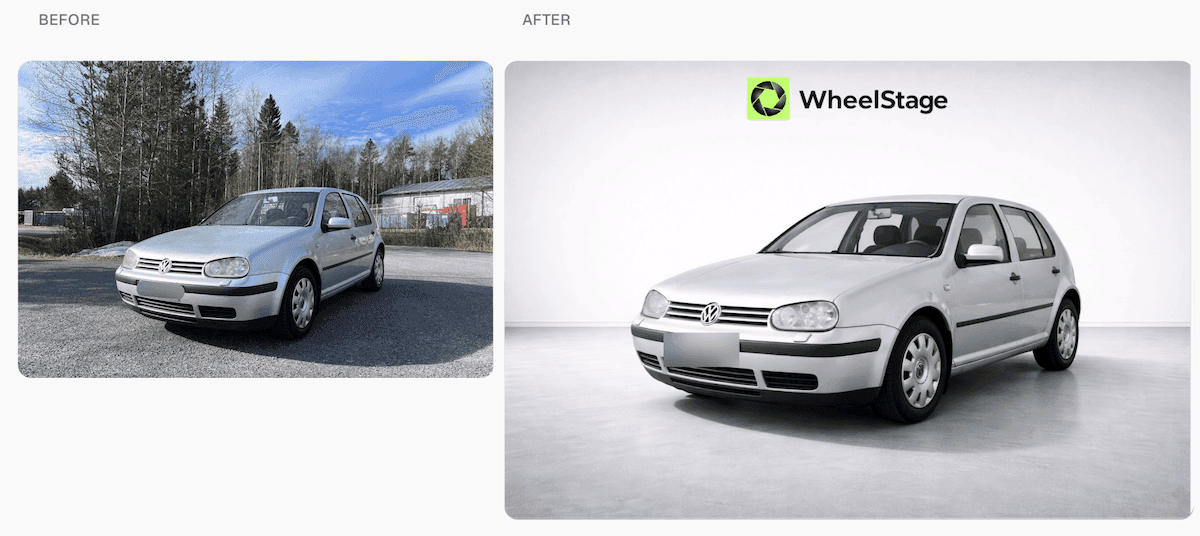
Volkswagen listing photo enhanced with WheelStage in under 30 seconds.
You can try this yourself — new accounts start with 5 free credits, no credit card required.
When to Choose Cropy AI
- You want a dedicated mobile app for on-the-lot capture and editing
- You need 360° virtual spins from walk-around videos
- You want image upscaling for low-resolution photos
- You need reflection removal or angle correction
- You prefer a predictable monthly subscription
When to Choose WheelStage
- You want the lowest per-image cost without a monthly commitment
- You prefer pay-as-you-go pricing that matches your actual volume
- You want to process images from any device through a browser
- You value speed — ~30 seconds per image
- You want a focused tool without features you won't use
The Bottom Line
Cropy AI and WheelStage are closer competitors than many of the enterprise platforms out there. Both are accessible, relatively affordable, and focused on making car photos look professional. The difference comes down to workflow preference and pricing model.
Cropy AI gives you a mobile app with extra features like 360° spins and image upscaling, bundled into a monthly subscription. WheelStage gives you fast, focused background editing through your browser, with pay-as-you-go pricing that's cheaper at most volume levels.
If you want to see how WheelStage handles your photos, the first 5 credits are on us.
See WheelStage in action
Watch how WheelStage transforms your car photos in seconds.

Written by
AO from WheelStage
Car owner and enthusiast, founder of WheelStage.