
CarCutter Alternative: WheelStage vs CarCutter
 AO from WheelStage·4 min read
CarCutter is one of the more established names in AI-powered automotive photography. Founded in 2016 and headquartered in Austria, they work with enterprise-level dealer groups like AutoNation, Koons, and Ourisman. If you've been researching tools to improve your listing photos, you've likely come across them.
WheelStage takes a very different approach to the same problem. This article breaks down how the two compare so you can decide which one makes sense for your operation.
Quick Comparison
| CarCutter | WheelStage | |
|---|---|---|
| Approach | End-to-end platform | Focused background editing tool |
| Pricing | Custom (contact sales) | Pay-as-you-go from $0.19/img |
| Capture App | Yes (guided) | No |
| 360° Spins | Yes | No |
| Setup | Demo + onboarding | Instant signup |
| Plate Blur Option | Yes | Yes |
| Speed | Full pipeline | ~30 seconds per image |
How CarCutter Works
CarCutter is a full visual merchandising platform. The workflow starts with their mobile capture app, which guides staff through a predefined shot list with alignment overlays and cut-off detection. Photos are then processed through their AI pipeline for background replacement, enhancement, and reordering. From there, images can be pushed directly to marketplaces, websites, and ad channels through integrations with existing dealer management systems.
Key features include:
- Guided mobile capture app (iOS & Android) with step-by-step shot instructions
- AI background replacement with 3D showroom-style backgrounds
- 360° interactive spins from as few as 4 photos
- Hotspot overlays for highlighting specific vehicle features
- CarCutter Hub — a centralized dashboard for managing imagery across multiple rooftops
- DMS and IMS integrations for automated publishing
- OEM compliance tools for meeting manufacturer brand guidelines
CarCutter positions itself as an end-to-end solution: capture, process, manage, and publish — all from one platform.
How WheelStage Works
WheelStage is focused on one step of that pipeline: turning your existing car photos into professional, studio-quality images.
There's no capture app, no shot list management, and no publishing integrations. You take your photos however you normally do — phone, camera, whatever works — and upload them to WheelStage. Choose a studio background, and the AI processes the image in seconds. The result is a clean, professional photo ready to download and use anywhere.
Key features include:
- AI background replacement with multiple studio presets
- Automatic license plate blurring with optional logo overlay
- Custom logo placement on processed images
- Batch processing — upload multiple images at once
- Pay-as-you-go credits — no subscription required
WheelStage deliberately stays focused. It doesn't try to manage your photo workflow or integrate with your DMS. It just makes your photos look professional, fast.
Where Each Tool Shines
The biggest difference between CarCutter and WheelStage isn't who they're for — it's how they approach the problem.
CarCutter is a platform. It covers the full pipeline: capture, edit, manage, publish. Its strength is workflow management — guided capture apps, multi-rooftop dashboards, DMS integrations, OEM compliance. If your operation needs that level of structure and automation, CarCutter delivers it. Their client list includes large groups like AutoNation and Koons, but the platform works for any dealership that wants an all-in-one visual merchandising system.
WheelStage is a tool. It does one thing — AI car photo editing — and it does it well. The focus is on simplicity, speed, and affordability. There's no workflow to learn, no onboarding process, and no features you're paying for but not using. This makes it a natural fit for independent dealers, small to mid-sized dealerships, and marketplace sellers, but it works just as well for multi-location operations that want fast, affordable photo editing without adopting a full platform.
Pricing
CarCutter doesn't publish pricing on their website. You'll need to book a demo and talk to their sales team for a quote. This is common for platforms where pricing is customized based on the number of locations, volume, and feature requirements. Industry benchmarks for platforms like CarCutter typically range from $0.50–$3.00 per image or custom monthly contracts.
WheelStage uses transparent, pay-as-you-go pricing:
| Credits | Price | Per Image |
|---|---|---|
| 50 | $19 | $0.38 |
| 200 | $66 | $0.33 |
| 500 | $140 | $0.28 |
| 2,000 | $460 | $0.23 |
| 5,000 | $950 | $0.19 |
No subscriptions, no contracts, no sales calls. You sign up, buy credits, and start processing. New users get 5 free credits to try it out.
The Trade-Offs
Every tool has trade-offs, and being honest about them helps you make the right choice.
What CarCutter does better:
- The guided capture app ensures consistent shot angles across staff and locations — something WheelStage doesn't offer since it works with whatever photos you bring
- 360° spins and hotspot overlays add interactive elements to listings that static photos can't match
- Enterprise integrations mean processed images flow automatically into your existing systems
- Multi-rooftop management gives dealer groups a single dashboard for all locations
What WheelStage does better:
- No onboarding, no sales calls, no training — you can be processing images within minutes of signing up
- Transparent pricing that you can see before committing, with no minimum volume or contract
- Pay only for what you use — if you process 10 images this month and 200 next month, that's fine
- The processing itself is fast and focused: upload, choose background, download
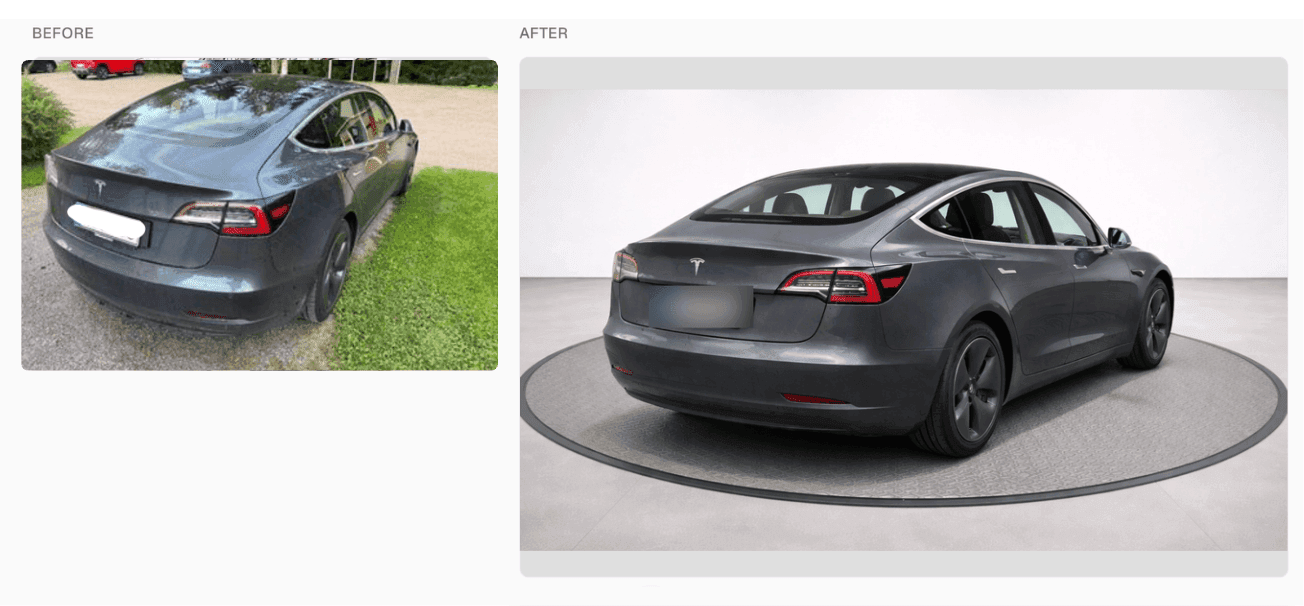
Tesla Model 3 listing photo enhanced with WheelStage in under 30 seconds.
You can try this yourself — new accounts start with 5 free credits, no credit card required.
When to Choose CarCutter
- You run a multi-location dealer group and need consistent branding across rooftops
- You want a guided capture workflow to standardize how staff photograph vehicles
- You need 360° spins, hotspots, or interactive showroom features
- You want automated publishing to marketplaces and your website
- You have the budget and willingness to go through a sales and onboarding process
When to Choose WheelStage
- You want studio-quality car photos without adopting a full platform
- You already have a way of taking photos and just need them to look professional
- You want to start immediately without demos, contracts, or onboarding
- You prefer paying per image rather than committing to a subscription
- You value simplicity — upload, choose background, download, done
The Bottom Line
CarCutter and WheelStage take different approaches to the same problem. CarCutter is a comprehensive platform that covers the full visual merchandising pipeline — from capture to publishing. WheelStage is a focused, affordable tool that does one thing really well: making your car photos look professional.
Neither is universally better — it comes down to whether you need a platform or a tool. If you want an end-to-end system with guided capture and integrations, CarCutter is worth exploring. If you want great listing photos without the complexity, give WheelStage a try — the first 5 credits are on us.
See WheelStage in action
Watch how WheelStage transforms your car photos in seconds.

Written by
AO from WheelStage
Car owner and enthusiast, founder of WheelStage.